
Create one or several scheduled reclaim request
Create a scheduled reclaim request
Create multiple scheduled reclaim requests
Edit a scheduled reclaim request
Create a scheduled reclaim request
Do you need to schedule a charge in advance? Does your customer want to pay in installments? Would you like to set up staggered debits?
You can do it easily in just a few clicks!
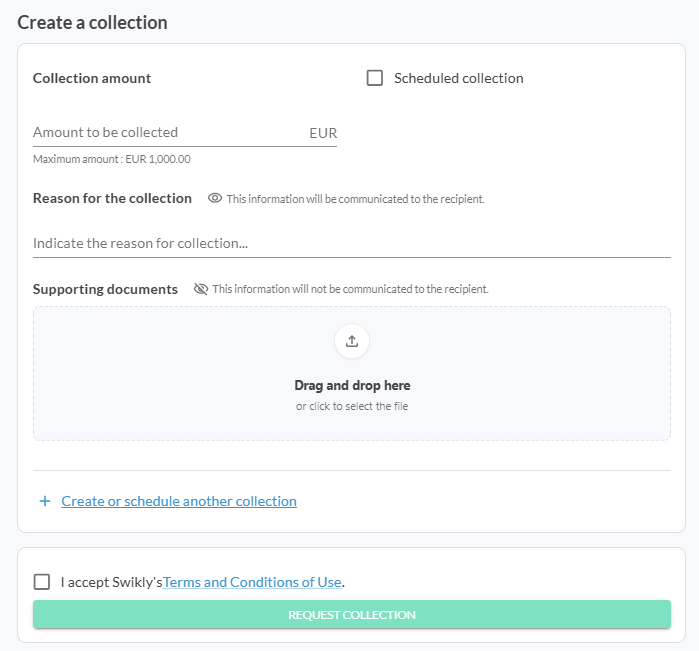
From your dashboard, click the "Collect" button on the relevant deposit. In the window that opens:
- Check the "Scheduled collection" box
- Enter the amount to be charged
- Enter the charge date
- Note: The scheduled date must be after today’s date and cannot exceed the deposit’s expiration date
- Fill in the reason for the request
- Add supporting documents if necessary
Create multiple scheduled reclaim requests
Nothing could be easier!
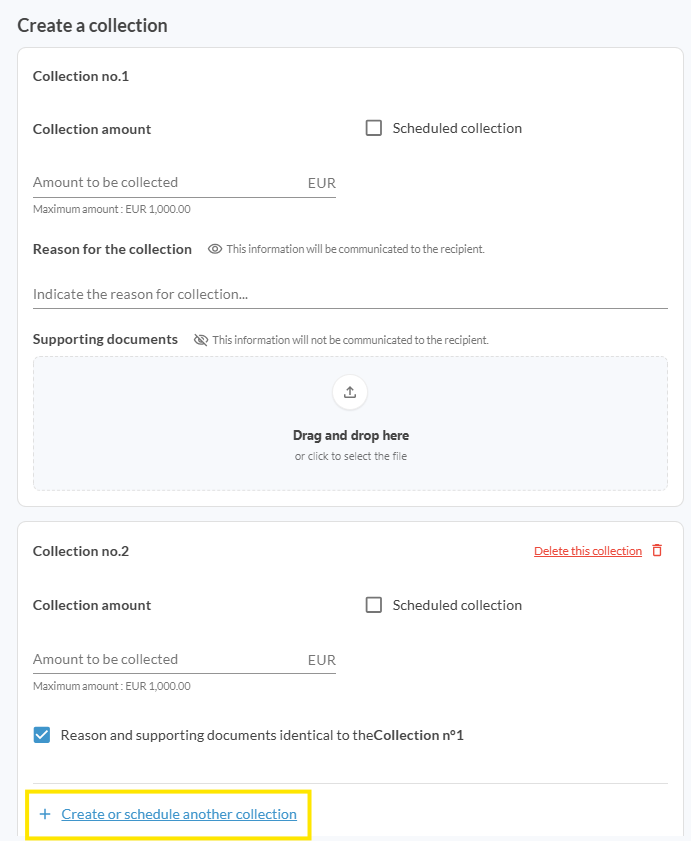
- Follow the steps above to create a scheduled charge.
- Then click on "Create or schedule another charge".
- A new section will appear: you can create as many charges as needed.
Please note: The total of the entered amounts must not exceed the maximum chargeable amount.
Edit a scheduled reclaim request
All your scheduled charges are visible from your dashboard.
You can modify them by clicking the "Change" button on the relevant deposit.

You will be able to:
-
Modify the charge date
-
Modify the amount
-
Modify the reason for the request
-
Add additional supporting documents